
TextExpander abbreviation design
March 15, 2010 at 12:17 PM by Dr. Drang
You’ve probably seen Merlin Mann’s little screencast about TextExpander 3. He does a nice job of showing dynamically what I tried to show statically in this post: TE3’s new feature that lets you define snippets with multiple fill-in-the-blank fields. Watching the video, I learned a couple of things about Merlin’s use of TextExpander:
- He has his abbreviations expanded immediately instead of using a delimiter.
- He uses simple abbreviations without any special characters.
Because I also have my abbreviations expanded immediately, I’m a bit surprised Merlin doesn’t use a “signal character” to distinguish his abbreviations. Let me explain what I do and why.
First, delimiters. TextExpander’s Preferences give you the option of expanding snippets as soon as you finish typing the abbreviation or waiting until you’ve typed a delimiter.
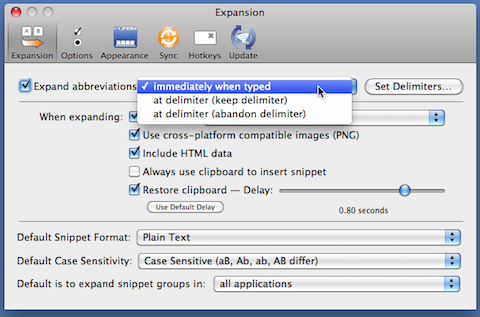
A delimiter is typically a “word-ending” character: a space, a tab, or any one of a number of punctuation marks.
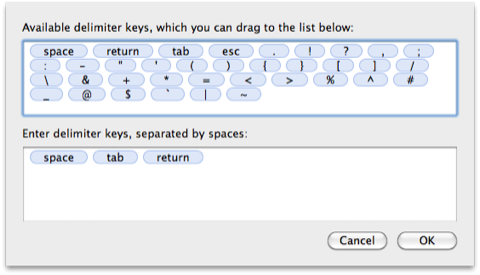
The idea behind delimiters is to keep TextExpander from doing an expansion sooner than you want it to. For example, a natural abbreviation for “TextExpander” is “te,” but if you have that as your abbreviation and you use immediate expansion, you’d never be able to type a word like “tell”—as soon as you hit the “e,” TextExpander would do the expansion, and you’d end up with “TextExpanderll.” Using delimiters, the expansion will only occur when you type “te” as a separate word.
Unfortunately, forcing TextExpander to wait until a delimiter is typed isn’t a complete solution. Depending on context, “te” might make a great variable name, and if I wanted a program line like
te = sys.argv[2]
TextExpander would turn it into
TextExpander = sys.argv[2]
You can tell TextExpander not to expand abbreviations in certain applications, but that does me no good, as I write both regular text and programs in the same application. (At the beginning of Merlin’s screencast, you see that he uses “sdate” as one of his abbreviations. That’s an even better variable name than “te.”)
Also, I have TextExpander fix some of my common typos. I have an “hte” snippet that expands to “the.”1 By using immediate expansion instead of delimiters, that snippet works to correct “htere” and “hten” as well as “hte” itself.
So, since delimited expansion doesn’t get me what I want, I use immediate expansion and a trick. The trick is to always start my abbreviations with a semicolon. There are no situations in my writing or programming in which a semicolon will be followed by anything other than whitespace. In English, a semicolon is always followed by a space; and in programming it’s almost always a statement delimiter—illegal to use in a variable name. Yes, most languages allow you to squeeze statements together,
a=5;b=6;
but that’s not considered good style unless you’re doing a Perl one-liner on the command line. It’s not something that comes up in my programming.
The semicolon is the perfect special character for abbreviations not only because of its use in English and programming, but also because of its position on the keyboard. It’s one of the home keys and it doesn’t require a Shift. Typing it is almost effortless.
With my system, an abbreviation like ;te works perfectly, as do abbreviations like
;bill, which gives me the fill-in-the-blanks expansion I showed in my earlier post;apple, which expands2 to the Apple character, ;shift, which expands to the Shift key character, ⇧;times, which expands to the multiplication symbol, ×
These are, I think, the natural abbreviations to use, and because they are real words, they wouldn’t work as abbreviations if it weren’t for the leading semicolon.
I know I’m not the only one who does this. I’m pretty sure I once saw a Twitter exchange between Jason Snell and John Gruber in which they each learned that the other used leading semicolons. When I saw that, I knew I was in good company.
Sadly, the semicolon trick is a poor match for the iPhone version of TextExpander because the semicolon key isn’t on the iPhone’s main keyboard. The few snippets I have on the iPhone—mostly date and time stamps—use a trailing “z” to distinguish them from real words. It’s not as good as the semicolon trick, but it works with a limited number of snippets.