
TextExpander 3
March 11, 2010 at 10:59 PM by Dr. Drang
Smile On My Mac released a new version of TextExpander this week. It has some distinct improvements over the previous version and one disappointment.
TextExpander is a utility—it was a Preference Pane, but now it’s a regular application—that expands abbreviations automatically as you type. You define both the abbreviations and what they expand into to fit the type of writing you do. So if you do a lot of writing on, say, Castigliano’s Second Theorem, you could define an abbreviation like “c2t” that would expand out to the full expression. You can also define snippets (that’s what TextExpander calls its abbreviation/full expansion combinations) for the current date and time, as well as snippets that insert the output of AppleScripts or shell/Perl/Python/Ruby/etc. scripts. It’s a great utility, and I use it a lot.
(TextExpander is, I think, not quite as versatile as the snippet facility built in to TextMate, but it’s getting closer with every update. And it can be used in any application.)
The two big improvements in TextExpander 3 are multi-computer syncing of your snippet library via Dropbox and snippets with several fill-in-the-blank fields.
Syncing via Dropbox is pretty self-explanatory. If you work at more than one Mac, you can keep your snippet library in your Dropbox folder and it will automatically sync across your machines. I haven’t been able to test this, for reasons that I’ll explain later, but if it works it will remove one minor frustration: typing an abbreviation defined on your other computer and not seeing it expand.
Snippets with several fill-in-the-blank fields will be great for certain types of boilerplate text. When one of these snippets is triggered, it pops up a window with the text, and you fill in the empty fields, tabbing from one to the next as you type.
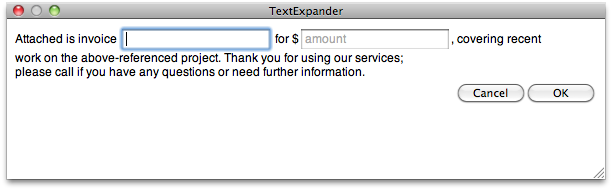
Earlier versions of TextExpander had a less useful version of this. You could create a snippet that put the cursor at a spot in the middle of the text after expansion; this gave you the effect of a single fill-in-the-blank field. Multiple fields will let you use a single snippet to the do the work that used to take several.
So I’m generally happy with the upgrade, but there is a sore point: TextExpander 3 requires Snow Leopard, and one of my computers is a iBook G4, and it can’t run Snow Leopard because it doesn’t have an Intel processor. I don’t know if the Smile On My Mac folks have been listening to Brent Simmons, but this restriction is very disappointing to me. I haven’t replaced the iBook with a newer MacBook because I like its form factor and much of what I do on it is text-based, which doesn’t need a lot of computing power. Now, the latest version of one of my workhorse utilities for text won’t run on it.
Of course, TextExpander 2.x still runs just fine on the iBook, so it’s not like I’ve lost anything. But I can’t take advantage of the Dropbox syncing if only one of my computers has that feature. And it’s really annoying to see this update sheet appear on a machine that can’t install the update.
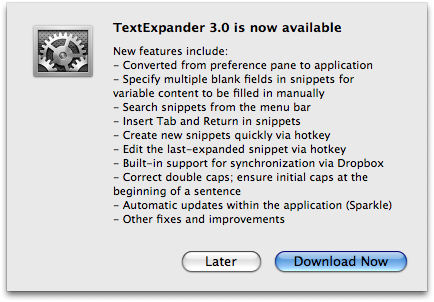
That’s just rubbing it in.