
Keyboard Maestro launchers
April 19, 2026 at 9:41 AM by Dr. Drang
During my seven-week Spotlight trial, I was reminded of how easy it is to make file and folder launchers in Keyboard Maestro. In case you’ve also forgotten, here’s a short post on how to do it.
There are three items that I open quite often and that Spotlight was slow to find:
- My
blog-stuffdirectory, which is where I keep all the text files, scripts, images, and other components that go into making blog posts. Each post, or set of posts, gets its own subdirectory inblog-stuff. - My notebook index file, which is where I keep a list of all the entries in my paper notebooks.
- My
calendricaldirectory, which is where I keep the code and support files for my current programming project: a Python module implementing the functions described in Reingold & Dershowitz’s Calendrical Calculations. This folder differs from the items above in that I won’t always need quick access to it, but I will until the project is finished.
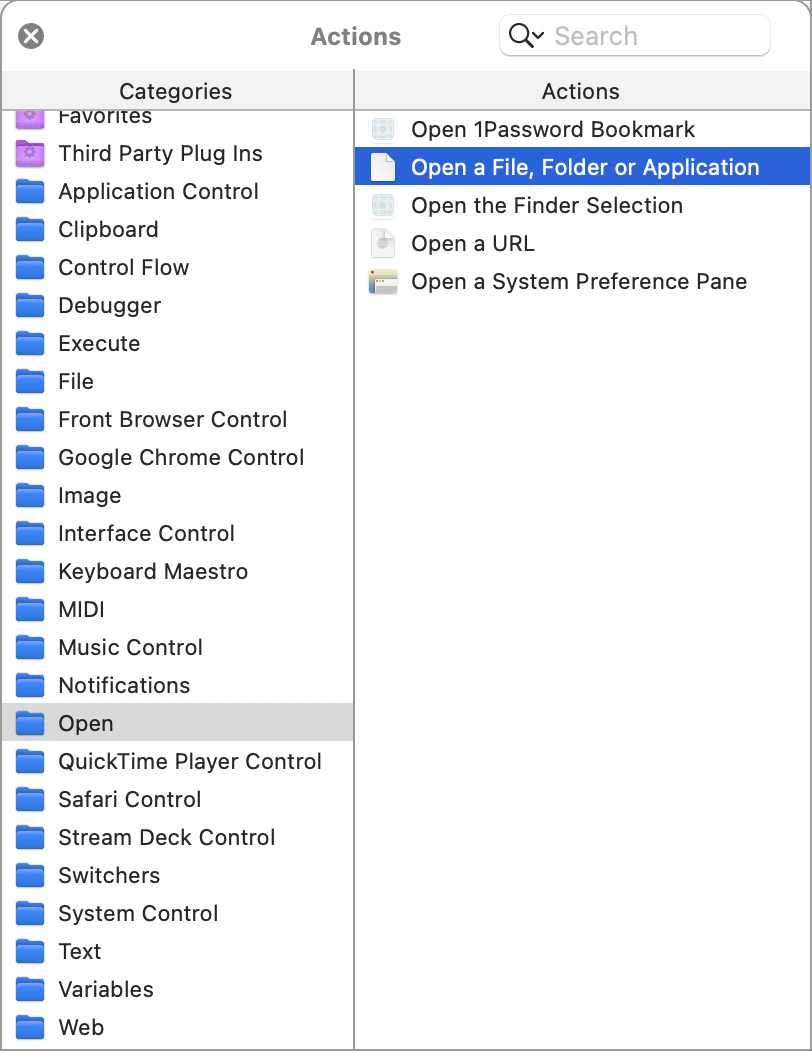
The key to making a Keyboard Maestro macro to instantly launch a file or folder is the action in the category. Here’s where you’ll find it in the Actions panel.
The macros for opening the blog-stuff and calendrical folders in the Finder are one-step macros that look like this:
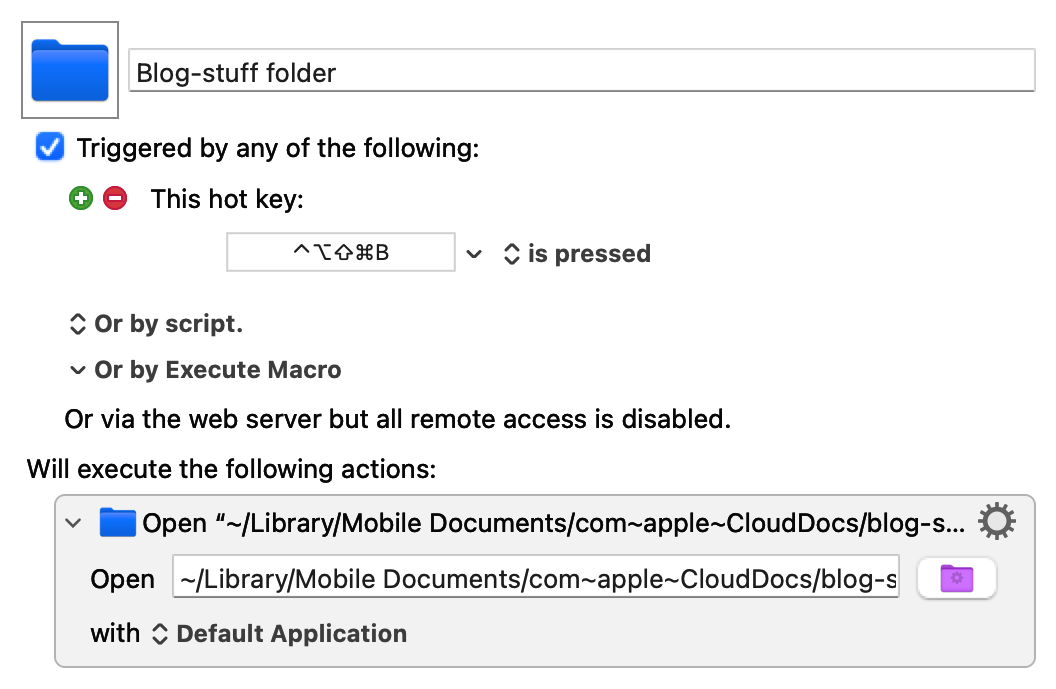
The path to the blog-stuff folder is
~/Library/Mobile Documents/com~apple~CloudDocs/blog-stuff
The calendrical macro looks the same, except it uses the keyboard shortcut ⌃⌥⇧⌘C and opens
~/Library/Mobile Documents/com~apple~CloudDocs/programming/calendrical
(These keyboard shortcuts have the sort of complicated chording I’d never use if I weren’t running Karabiner Elements to turn Caps Lock into a “Hyper” key that mimics pressing ⌃⌥⇧⌘ simultaneously. If you read Brett Terpstra, you’ll recognize the Hyper key.)
The macro for opening the notebook index file is only slightly more complicated:
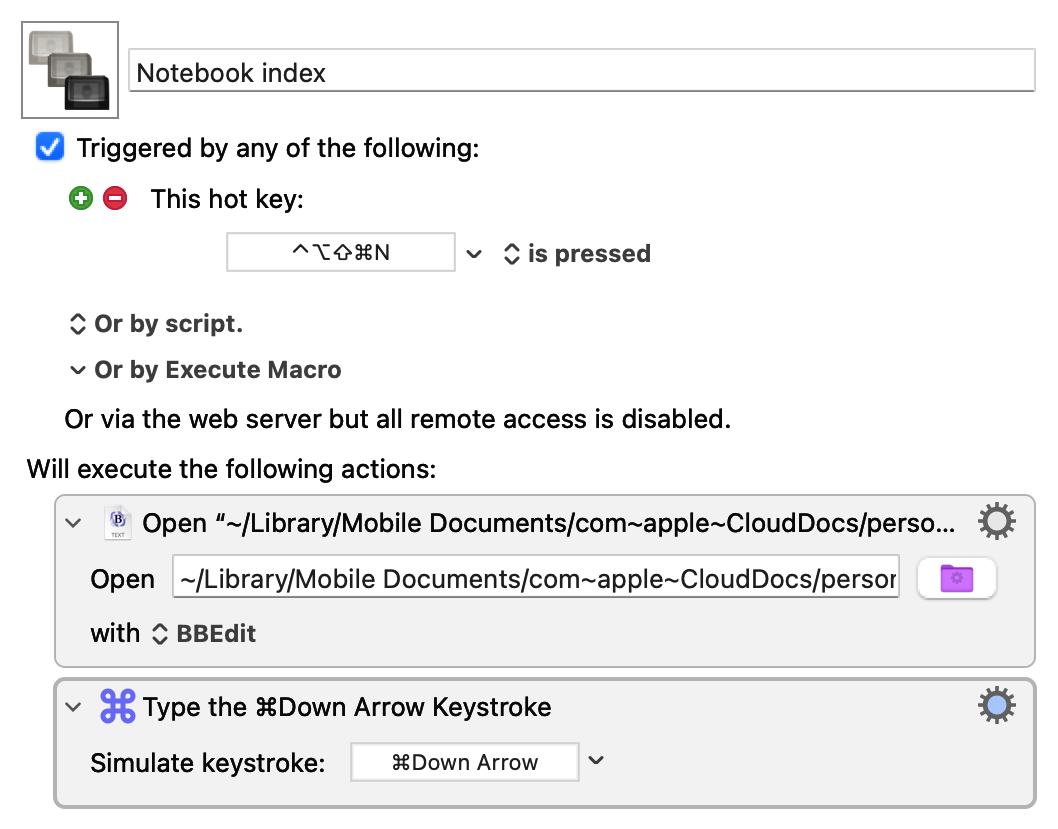
The path to the file is
~/Library/Mobile Documents/com~apple~CloudDocs/personal/Notebook index.txt
and the second step puts the cursor at the bottom of the file, which is usually where I want it, as I’m typically opening the index to add a new entry.
Even though I’m back with LaunchBar, and I can use it to get to these files and folders quickly, I’m keeping the macros. They’re not that much faster than ⌘-Space and typing a few characters, but they’re more accurate. There’s no risk of typing “cla” instead of “cal” when I want to open the calendrical folder.
Launchers and me
April 18, 2026 at 11:13 AM by Dr. Drang
I started using launchers shortly after returning to the Mac (from Linux) in 2005. The first one I used was the great Quicksilver. I’m sure I learned about it from Merlin Mann, who was Quicksilver’s biggest advocate, but I can’t point to which of his many posts on QS got me started.
When Nicholas Jitkoff (Alcor) stopped developing Quicksilver in 2007 or so, I switched to LaunchBar, and that’s been my main launcher ever since.1 I gave Alfred a workout for a few months—inspired, I think, by this episode of Mac Power Users—and I’ve tried Spotlight a few times, but I’ve always returned to LaunchBar.
My most recent trial of Spotlight began in late February and ended yesterday. I’d been hearing about the new and improved Spotlight since the introduction of macOS 26/Tahoe, and this episode of Upgrade inspired me to give it another shot. You may recall that as the episode in which Jason and Myke reviewed the results of Jason’s annual Apple Report Card, and they talked about Spotlight as being one of Tahoe’s significant improvements.
So I turned off LaunchBar and began using Spotlight exclusively. It sucked. I hung on that long only because I kept thinking, “Surely it’s going to improve as it learns my habits.” It didn’t. It was unbearably slow when I started using it, and it was still unbearably slow when I finally decided to pull the plug on it yesterday.
How slow? Finding files and folders—even files and folders that I had been searching for and opening for a few days—typically took several seconds (yes, s…e…v…e…r…a…l seconds). Finding and launching apps with Spotlight was much faster, but even that had a noticeable delay. You may remember that Quicksilver was so-named because it was quick—so are LaunchBar and Alfred. Spotlight, despite being a system feature, is not.
So I’m back to LaunchBar. A new release came out during my Spotlight experiment, which was heartening, as I’ve been worried about LaunchBar’s continued viability as a product. I upgraded and reindexed my system (which took only a few seconds), and it feels like I’m back at my Mac again.
One last thing: If you feel compelled to tell me the Good News about Raycast, please restrain yourself. I know about Raycast, and I know that it seems like just the thing for someone who does as much scripting and automation as I do. And maybe it is. But it seems like a project I don’t want to take on right now. If I change my mind, I’ll let you know.
Update 18 Apr 2026 1:07 PM
It’s possible that Spotlight would work at a reasonable speed if I reindexed it. Myke Hurley has mentioned (not in the above-linked episode, but in others) that he’s needed to reindex Spotlight a couple of times. If that’s what I need to do to get it to work properly, count me out. Yes, I did reindex LaunchBar yesterday, but that was because it hadn’t run in seven weeks, and I wanted it up to date right away—I’ve never had to reindex it regularly.
-
I’ve never tried the reconstituted Quicksilver. It may be fine, but I just don’t think it has enough momentum behind it. ↩
Easter in Mathematica
April 5, 2026 at 7:42 PM by Dr. Drang
Yesterday’s post included some behind-the-scenes calculations that I figured were worth talking about. They were all done in Mathematica, and here’s the notebook I used:
The first calculation works out the days of the vernal equinox in every year from 1961 through 2026. The key function for this is FindAstroEvent, a fairly new function that returns the date and time of the first occurrence of a given event after the given date. I asked for the first MarchEquinox after January 1 of each year, and I wanted the time to be given in Greenwich Mean Time. Since I only cared about the day of the month, I used the DateList function to convert the DateObject returned by FindAstroEvent into a list of year, month, day, hour, minute, and second and pulled out just the third item of that list.
With equinoxes set to a list of 19s, 20s, and 21s, I used the Tally function to count the occurrences of each day number. As you can see, there were 58 20s in the list of 66 equinoxes, so I included that result in the post to show that March 20 is the most common date of the vernal equinox.
The remaining calculations were done to compare the algorithmic date of Easter with the date that Easter would be if it were determined by the actual date of the first full moon after the vernal equinox. So I used FindAstroEvent again, this time setting the event to FullMoon and the date to the equinox dates calculated earlier. That list of DateObjects was saved to the variable fullMoons.
I needed to compare these dates to the dates of Easter for the years of interest. Oddly, Mathematica doesn’t seem to have a built-in function for calculating Easter, but it does have a ResourceFunction. The function is called EasterSunday, and it calculates the date for the given year.
With the lists of easters and fullMoons in hand, I subtracted the latter from the former. If the difference is more than a week, the algorithmic and astronomical Easters aren’t in agreement. As you can see, there are two instances in which Easter is 31 days after the full moon: first in 1962 (which I didn’t mention in the post) and then again in 2019 (which I did). The final calculation was just a repeat of one of the calculations in equinoxes; I did it again so I wouldn’t have to hunt down the 2019 equinox date.
I’m not sure when I learned of the FindAstroEvent function, but it really came in handy yesterday. I’m pretty sure there are functions in Calendrical Calculations that deal with equinoxes and full moons, but I haven’t gotten that far in the book yet.
Scientific American’s Easter
April 4, 2026 at 11:12 PM by Dr. Drang
In its continuing attempt to teach us how calendars work, Scientific American has an article (Apple News link) up today that goes through Gauss’s algorithm for calculating the date of Easter. The article was written by Manon Bischoff, who also wrote the Friday the 13th article I covered a few weeks ago.
There are a few small mistakes in the article: one computational and two definitional. Let’s take a look at them.
The computational error comes in the calculation of the intermediate value p. The article says
where the topless brackets mean the floor function, the integer less than or equal to what’s inside the brackets. The correct equation is
In both equations, k is
i.e., the first two digits of the year (at least until we get to the year 10,000).
In giving the wrong equation for p, Bischoff is following Gauss himself. In the original presentation of his Easter algorithm, Gauss gave the same simple formula as Bischoff, but he corrected it several years later. Why Bischoff is still using the wrong equation two centuries later is anyone’s guess.
Actually, I can guess. Maybe Bischoff’s using the wrong formula for p because it’s simpler and the error won’t manifest itself until the year 4200 (!). Here’s a quick Python script to see the centuries, starting in the 1600s, for which the simpler formula is wrong:
python:
for k in range(16, 60):
  if k//3 != (13 + 8*k)//25:
    print(f'Century {k*100} gives the wrong value')
The output is
Century 4200 gives the wrong value
Century 4500 gives the wrong value
Century 4800 gives the wrong value
Century 5100 gives the wrong value
Century 5400 gives the wrong value
Century 5700 gives the wrong value
I think we can live with a mistake that won’t rear its head for over 2000 years.
I’m less inclined to overlook the definitional errors in the article’s early paragraphs. This one:
For those who celebrate it, tracking what day the holiday Easter takes place on can be a challenge. According to Christian religious traditions, Easter Sunday falls on the first Sunday following the first full moon after the vernal equinox.
And this one:
[T]he vernal equinox, or start of spring, is fixed as March 21. If a full moon occurs on that exact day, March 22 becomes the earliest possible calendar date for Easter Sunday. According to the lunar calendar, the latest possible date for a full moon after March 21 is April 18. That means Easter Sunday never falls later than April 25.
While it’s true that the idea behind the date of Easter is to be “on the first Sunday following the first full moon after the vernal equinox,” when it comes to determining Easter, both the equinox and the lunar cycle are estimated—they aren’t based on accurate astronomical calculations or observations.
First, let’s look at the vernal equinox.1 One need only think back a couple of weeks to realize that it isn’t “fixed as March 21.” The most recent equinox was on March 20, as were 58 of the 66 vernal equinoxes I’ve lived through. March 20 is by far the most common date for the true vernal equinox. The Church fathers who set the date of Easter used March 21 as an approximation because it made the calculation simple and resulted in Easters more or less when they thought they should be.
Similarly, they used the Metonic cycle—with some occasional adjustments—to estimate when full moons would occur. There are almost exactly 235 lunar months in 19 years, a fact you can use to calculate a good estimate of when full moons occur.2 But this is an average, and because lunar months vary in length, the date of a calculated full moon doesn’t always fall on the date of an actual full moon. (There’s also a slow drift that has to be accounted for.)
So although the date of Easter is guided by astronomical events, it isn’t determined by them. As it happens, this year the vernal equinox was, as we said, on Friday, March 20, and the following full moon was on Wednesday, April 1. So having Easter Sunday on April 5 works out both astronomically and algorithmically. But in 2019, that wasn’t the case. The vernal equinox was on Wednesday, March 20; the following full moon was on Thursday, March 21; but Easter Sunday was celebrated on April 21, not March 24.