I’m pissed at the Library of Congress
October 8, 2026 at 9:27 PM by Dr. Drang
Today I tried to add a couple of recently purchased books to my library database using my lccn2library script. It failed because the Library of Congress has either moved or deleted the files lccn2library relies on.
Let’s say I was trying to add Applied Elasticity by Timoshenko and Lessells.1 If you go to the LoC’s MARC record for the book and click on the Download link, you’ll see a popup that looks like this:

So it looks like you can click the MODS link to get the MODS file for the book. That’s the file my script parses to get the information to add to the database. The MODS link for this book is
https://lccn.loc.gov/26010978/mods
which is the URL form that lccn2library expects. Unfortunately, that link returns an empty file. And not just for that book, but for every book I tried. What does the little northeast-pointing arrow mean? Beats me. You’d think it was an indication that the MODS link was pointing to some external site, but that’s not the case.
Maybe I’ve caught the LoC in the middle of a transition to a new system for storing records in various formats. Maybe I’ll return in a month or two to find that everything is working again—perhaps with new URLs for the different formats. I hope so.
But until that hoped-for day, I’m pissed at the LoC because I have to add books to my database by hand using the sqlite3 interactive command-line tool. Which is slow but not terrible, especially since I’m adding only a book or two at a time.
The command to add a new book to the database is
INSERT INTO book(title, subtitle, volume, edition, publisher, published, lccn, loc, added)
VALUES(<list of values separated by commas>);
The book will be assigned an ID automatically. To get it, I run
SELECT id,title FROM book WHERE added IS "2026-10-08";
The first field in the output will be the ID. The date must be a string with the current date in yyyy-mm-dd format.
The new book may be written by an author already in the database. To check if that’s the case, I run
SELECT * FROM author WHERE name LIKE "%<portion of name>%";
If the author’s already in the database, that command will return their ID. If not, it returns nothing. I then run
INSERT INTO author(name) VALUES("<full name>");
and then the SELECT command above to get the author’s ID.
The final step is to add a record to the book_author table to tie the book and author together. That’s
INSERT INTO book_author(book_id, author_id) VALUES(<book ID>, <author ID>);
As I said, this is slow because it’s several steps, but none of the steps are difficult.
What will I do if the LoC never fixes the problem of the missing MODS files? I suppose I could parse the MARC records, which are still accessible, but that would be a pain in the ass. Maybe I’ll build a little interactive script where I can just type in the necessary information and have the script generate and run the SQL commands. I hope it doesn’t come to that.
-
It’d be so cool to have this book. It was written when Timoshenko had just come to the US and was working at Westinghouse before landing a teaching gig at the University of Michigan. Sadly, this was not one of the books I was adding to my library. ↩
Making a tall, skinny plot in Mathematica
October 7, 2026 at 12:12 PM by Dr. Drang
Yesterday’s post included this plot:
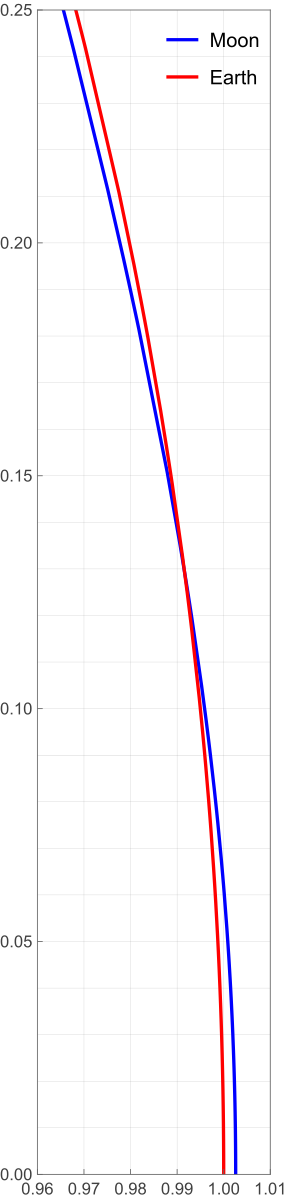
I figured it was worth a quick post to show how I made it.
I had already done most of the work back in 2022 in a Mathematica notebook I made to support my original orbital curvature post. So I copied the pertinent calculations from that notebook, pasted them into a new one, and made the adjustments necessary to produce the plot. Here’s the new notebook:
The bottom half of the notebook is where the plotting commands are. The key items are:
- The definitions of
xGrid,xTicks,yGrid, andyTicks. These produce lists of values used to lay out the grid spacing and tick mark labels. Most of this is self-explanatory, but I do want to call out the use ofNumberFormto format the tick labels with two decimal places.NumberForm[x, {3, 2}]is very much like Python’s{x:3.2f}in an f-string. Like most things in Mathematica, it’s kind of verbose, but it is readable. The call to
ParametricPlotincludes the optionAspectRatio -> .25/.05AspectRatiosets the ratio of height to width for the plot as a whole, so the value I set it to was based on the ratio of the values given in thePlotRangeoption. The overall plot is 0.25 units high and 0.05 units wide, so to make the x and y units the same size,AspectRatiois set to that ratio. I entered it as a division instead of as the number 5 because I wanted the reasoning behind it to be clear. I suppose I could have been even more explicit by sayingAspectRatio -> (.25 - 0)/(1.01 - .96)but there are limits to my verbosity, even when using Mathematica.
To get the image out of the notebook, I right-clicked on it, selected from the popup menu, and chose SVG as the format. That’s why the plot stays smooth if you zoom in on it.
Distorted plots
October 6, 2026 at 9:08 PM by Dr. Drang
Rhett Allain, physics professor and blogger, published a nice article today about the Moon’s orbit. It follows largely the same line of reasoning as my post on the same topic (and the various write-ups I linked to in that post) from a few years ago. I nodded my head as I read through it, until I got to a plot at the end of the article.
For much of the article, Allain complains about how the orbit of the Moon as it and the Earth make their way around the Sun is often distorted in textbooks. Like this, which is a frame from an animated GIF in the article.
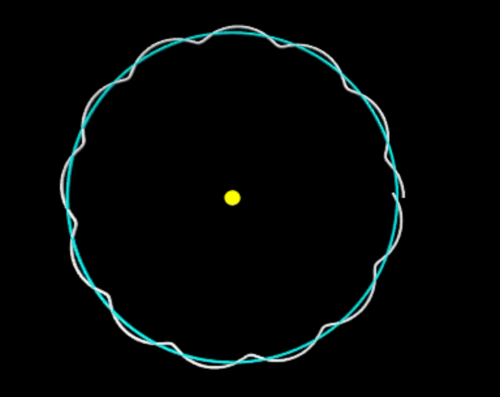
In this image, the Earth-Moon distance is exaggerated, and it looks like the Moon curves away from the Sun when it’s between the Earth and the Sun. To show that this is wrong, he plots portions of the Moon and Earth orbits without exaggerating the Moon-Earth distance:
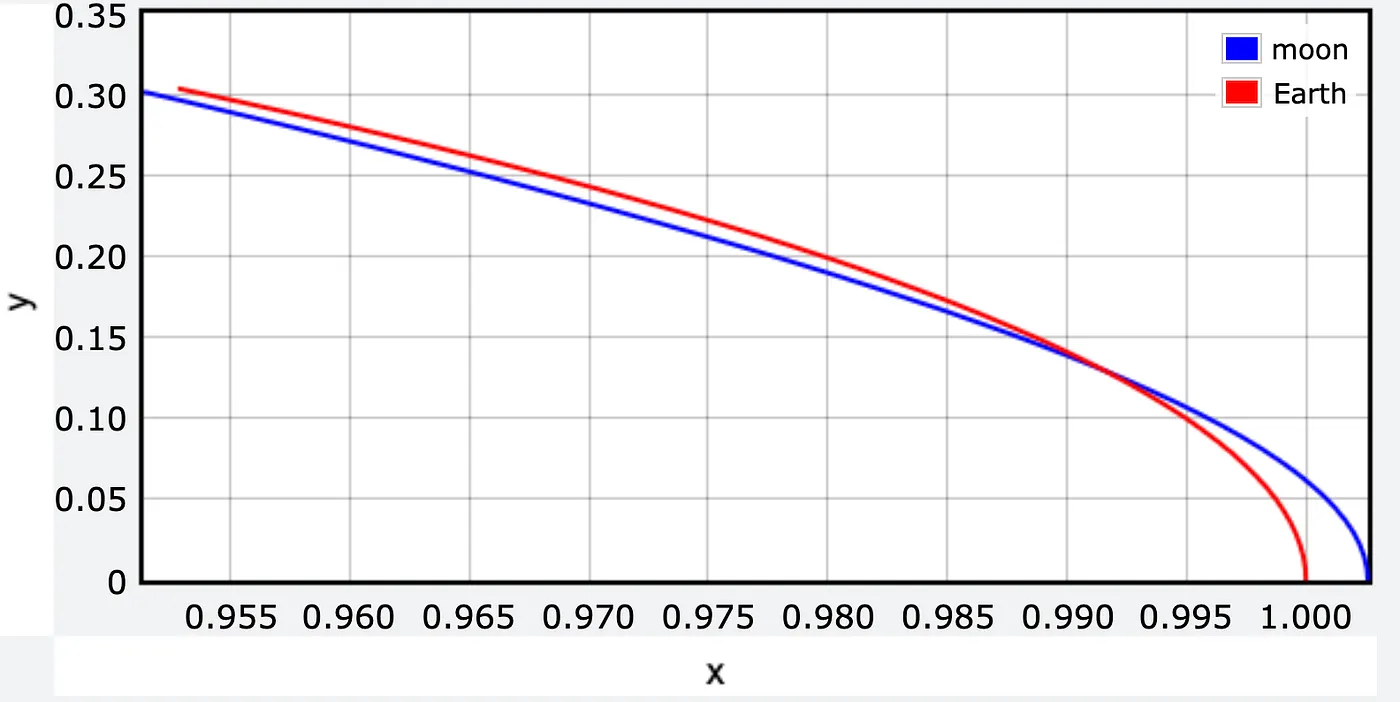
Forgive me, but what the actual fuck? How can you spend over 1000 words complaining about graphical distortions and then produce this? Sure, it’s not the same distortion he was complaining about, but still. The whole point of the article was to show that the Moon’s path over the course of an Earth year is a sort of wobbly circle around the Sun. The arcs in this plot are nowhere near circular.
Here’s a properly scaled version of Allain’s plot:
Yes, the plot is really tall and skinny. It has to be to avoid distorting the paths. Note that the grids are square and represent the same distance in each direction.
We all know how this happened. The range of the x data is very small compared to the range of the y data, but because the plotting software defaults to a landscape-style graph, the paths come out looking like arcs of very wide ellipses. Unless the person running the software steps in to make sure x and y distances are drawn to the same scale.
I could write a post like this almost every day. So many people accept the defaults of their graphing software without thinking about how one or two small tweaks could make their plots so much better.
Too dumb for AI
September 30, 2026 at 4:13 PM by Dr. Drang
I’ll admit that the first thing I looked into regarding yesterday’s “Super Intelligence” meeting at the White House was whether Tim Cook was there. He wasn’t, which was probably a relief to Tim, even though it’s also an admission that Apple isn’t considered a player in AI. By anyone, not even the idiots in the Trump administration.
You’ve probably seen the stupid misspelling above Trump’s signature on the “morally binding” agreement that came out of the meeting.
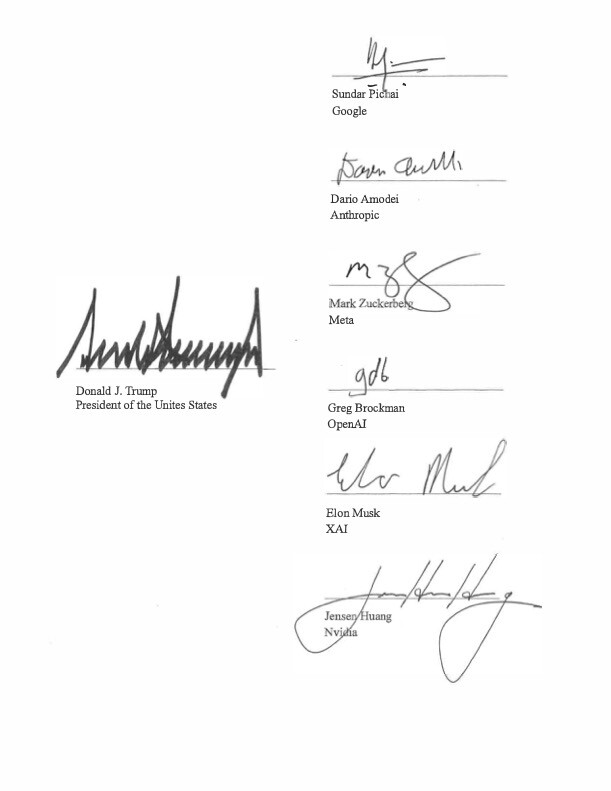
Yes, he signed it as the “President of the Unites States” and then proudly posted it to Truth Social. I can’t imagine the agreement means anything, as you’d be hard-pressed to find a single moral shared among the people in the meeting. I will say, though, that Jensen Huang’s signature is pretty spiffy.
As for who was at the meeting, Trump also posted this seating chart, which hurts to look at:
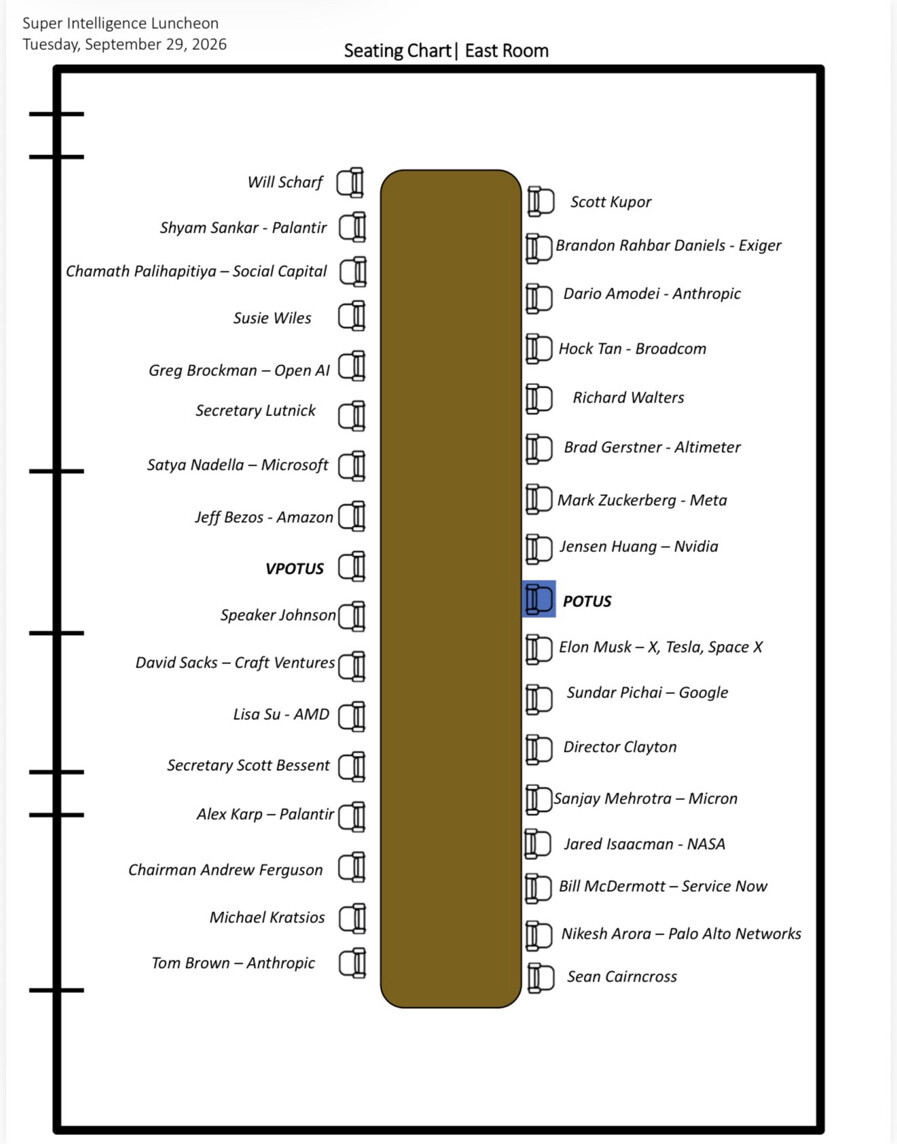
Click the image to see it at full size, if you dare. Also, don’t feel obligated to follow either of the Truth Social links; I’m including them only because I feel an obligation to give credit—or in this case blame.
Lots of the images Trump posts are AI-generated, but I find it hard to believe that any AI system would produce something with this many graphical errors:
- The chairs on the left side of the table are vertically offset from those on the right side, even though there are the same number on each side. Poor Will Scharf is nearly off the end.
- The chairs on the left are distinctly farther from the table than the chairs on the right.
- The vertical spaces between chairs on a given side aren’t equal. The seats near the ends are closer to one another than the seats near the center.
- The two lines of chairs aren’t horizontally aligned. This was perhaps the smallest mistake, and you probably can’t see it unless you zoom in, but what drawing app wouldn’t automatically align the items?
- The names and chairs aren’t aligned vertically. You’d expect the names to be centered vertically with the chairs, and many of them are at least close to that, but once you see Alex Karp and Andrew Ferguson you’ll notice several similar misalignments.
- The names on the left side should be right-aligned but aren’t. Susie Wiles is way out of her chair, while David Sacks has nearly crashed into his.
- Similarly, the names on the right side should be left-aligned but aren’t. See Richard Walters and Sanjay Mehrotra for the most extreme misalignments.
And then there’s the best one:
- The chairs are facing away from the table.
The meeting probably would have been better for all of us if this had been so.