
A trip to the dark side
February 8th, 2013 at 10:09 pm by Dr. Drang
I’ve spent the past week or two working with this beauty.
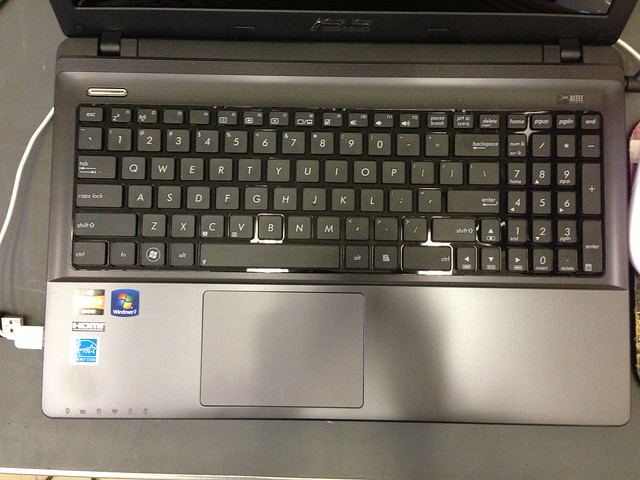
It’s an ASUS something-or-other that I picked up for $400 to act as a lab computer at work. A notebook is ideal for our lab, because our test fixtures are built on a per-project basis and could be almost anywhere in the building. It needs to be more portable than the dedicated boxes that drive our SEM and EDS machines.
It also needs to be a Windows computer, because the data acquisition software that works with the sensors I’m using in my current project is Windows-only. So I’ve been getting more exposure to Windows than is good for my blood pressure.
But let’s talk about the hardware first. Obviously, for $400 I didn’t expect much, and my expectations were met. The screen is fine and would no doubt display lovely images if the software I was using weren’t so unremittingly ugly. The processor (an AMD) is plenty fast for what I’m doing. But the keyboard! How can anyone use a keyboard like this for regular work?
The keys are mushy and the whole deck deflects when I type. And the layout of had to have been cooked up by someone who uses voice recognition software exclusively. I’ve often been annoyed at Apple’s half-sized cursor keys, but look at this:
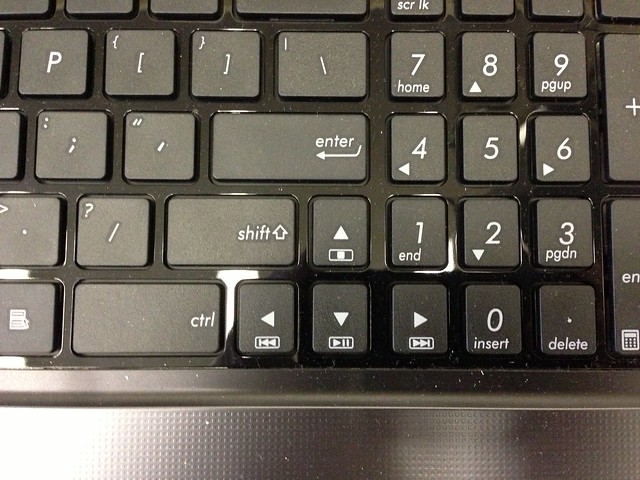
The Shift key has been shortened so the up-arrow key can fit in next to it. Guess how often I find the cursor one line up from where it ought to be?
The cursor keys are jammed in like that to accommodate the thoroughly unnecessary numeric keypad. This is the natural result of the checkbox school of design.
☑ Full-sized keyboard
☑ Full numeric keypad
It speaks also to what John Gruber was talking about in this post about the Microsoft Surface: there is no such thing as a “no compromises” design. Providing the numeric keypad ruined the usability of the rest of the keyboard.
The trackpad is worse than the keyboard. It’s too sticky, and my fingers skip and jump across the surface. Maybe it’ll get worked in with time, but I don’t have time—I need to use it now. I immediately plugged in an old mouse and wouldn’t consider using it any other way.1
The ASUS has three USB ports (☑), but the two on the left side are so close together that only the narrowest plugs can fit side-by-side. The reason the mouse is plugged in on the left is when the plug for the data sensors is in the other left port, I have to use the right side for my Kingston USB thumb drive. (Yes, I probably should just get the TUFF ’N’ TINY.)
I don’t have much to say about Windows 7 itself, other than
- The translucent windows are incredibly annoying with smeary text showing through every titlebar. There’s a setting to turn that off, right?
- For the first week, whenever I plugged in my thumb drive—the same thumb drive every time, I must add—a notice would pop up from the taskbar saying that it was installing a driver for the newly detected hardware. Why did it do that? Why did it stop? It’s Windows, Jake.
You will not be surprised to hear that the data acquisition software that came with the sensors is shit. It can’t remember most settings from one session to the next. It pops up huge windows with input fields at the top and the OK/Cancel buttons on the bottom. Because of the height of the window and where it’s positioned on the screen, the OK/Cancel buttons are hidden behind the taskbar, and I have to drag the screen up to get at them. It happily overwrites data files without warning if you forget to export the data or create a new file before running a new test.
I’ve said before that I believe Windows developers get away with this kind of crap because most Windows users don’t expect better. They believe working on a computer is painful drudgery, and because they don’t aim higher, that’s what they get.
[I feel certain there are delightful Windows programs out there somewhere, but I never see them. What I’m regularly exposed to are MS Word (ugh), Adobe Reader (double ugh), and QuickBooks (kill me).]
I realize that to some these complaints will sound like the whining of a child, someone too delicate to work outside Apple’s exquisitely manicured garden. But I just want to get my work done quickly and efficiently. Being forced to move a window to click a button or reposition the cursor because it’s jumped out of place prevent me from doing so.
-
You may have noticed that the mouse cord in the top photo was an unusual color for Windows hardware. It’s my old Apple (née Mighty) Mouse. To its credit, Windows 7 recognized the mouse immediately and has worked with it as well as if it were a Logitech. ↩


February 8th, 2013 at 10:57 pm
In my experience, Windows will give you the driver installation message each time you plug the device into a new USB port. Once you’ve plugged it into every port once, you stop seeing the popup so much.
February 8th, 2013 at 10:57 pm
Do you share my casual impression that Windows laptop users tend to have plug in mice much more often than Mac users? My wife, for example, used a mouse with her laptop up until the day I gave her my old PowerBook.
February 8th, 2013 at 11:08 pm
Aesthetics matter so much. Way more than we think.
February 9th, 2013 at 2:18 am
@3: I don’t think it’s aesthetics so much as usability. What drdrang seems to be commenting on is not so much the aesthetics of Windows and their OEM partners, but the affect of their design decisions on the end user.
I do want to offer the criticism on this paragraph, though:
When you say that, you imply that there is a conscious choice, both by the developers of Windows software and their users. Without it getting too literal, I’d like to say this example is much more aptly described by an analogy to the problems with insidious racism. The problem is that the large part of the PC market Windows has cornered goes about being effective, for the most part, so they don’t realize the biases inherent in the system within which they’re operating. It is as you say, something they’re used to. It’s their normal, even if it is your mediocre. I’d say the same for developers, as they, like developers of apps for the App Store, don’t use machines outside the ones they’re developing for. This creates a cultural lock-in, where they’re not aware of the UI decisions that make Macs so much more usable. The solution for both situations is cross-cultural communication. We need less posts about how Macs are so much more superior in usability, and a lot more that share the knowledge across boundaries.
February 9th, 2013 at 7:11 am
DAQ and specialty software are often the worst:
Just give me GPIB, LabVIEW (or even SignalExpress for simple stuff), and a programmer’s guide for the instrument.
February 9th, 2013 at 7:54 am
@Mike - yep.
I’ve used both for years. Some win behavior makes me crazy. And some OS X behavior makes me crazy.
Lesson here - you pretty much get what you pay for. So please stop whining that your $400 laptop has a worse keyboard than your $2000+ MBP.
With that said - wait until you have to use the abomination that is Win8…
February 9th, 2013 at 8:07 am
If you right-click the desktop and choose Personalize, then scroll the themes section all the way down, under the heading Basic and High Contrast Themes you will find a theme named “Windows 7 Basic” and another one called “Windows Classic”. Both of them will get rid of those annoying transparencies and smudgy text. I think you will like the classic one best.
My biggest problem with W7 is actually the taskbar, which is really, really stupid compared to the ones in previous versions of windows.
I have to use a Lenovo ThinkPad at work. The hardware is not bad at all, but the touchpad is a nightmare. Some designer at lenovo thought it’s a good idea to give it a bumpy surface! My fingertips are realy sour after a few minutes of use, and it comes nowhere near the touchpad on macs. On the highest sensitivity setting, it simply misses about a third of my swipes…
The only good thing is that in the office I have a docking station and I can use it with 2 big monitors, a mouse and a full size keyboard.
February 9th, 2013 at 9:28 am
Did you choose this laptop specifically for the numeric keypad? By the way, what would be an example of a delightful Mac program that has a similar counterpart in Windows?
February 9th, 2013 at 9:55 am
I think that one problem Windows developers face is the very large variety of hardware their software may be called upon to run on. As a result, even the best developers (those who have figured out the need to query the screen size at run time to ensure their windows will actually fit, for instance) wind up butting against hardware that just doesn’t work right with their app. The smaller hardware range of Apple products does make it easier to test against all possible platforms.
That being said, there does seem to be more of a design esthetic among Mac developers compared to Windows. And, frankly, when I was using Linux on my desktop just before moving back to Mac somewhere around 10.1, I found both KDE and GNome to be ugly as all heck.
Remember when Apple made the menu bar translucent? If I were new to OS X, how long would it have taken me to figure out how to get back my opaque menu bar?
I will note, however, that I find my one Windows 8 machine in the office to be totally unusable. What were they thinking? If we were trying to use it for anything more that a station to scan documents into our Dropbox repository, we’d have taken a blowtorch to it by now. We still haven’t figured out how to (if we can) just get back the old windows interface and get rid of those stupid tiles and impossible to navigate UI. At least XP was useable, if not pretty.
February 9th, 2013 at 12:34 pm
Is there a reason why you couldn’t use Parallels or VMware running Windows on a Mac? You would still have crappy data acquisition software, but at least it would be Apple hardware.
February 9th, 2013 at 9:01 pm
General and specific responses:
February 11th, 2013 at 1:43 pm
Another way to disable transparency without switching to a basic theme is to click the “Window Color” button below the “Basic and High Contrast Themes” section in that same “Personalize” control panel. You’ll then see an “Enable Transparency” checkbox that you can switch off, and you can change the window border color as well.
February 11th, 2013 at 5:57 pm
I’ve yet to try a Windows laptop with a good trackpad. I honestly don’t understand why that is. You’d think for a portable machine that would be one of the most important features. I’ve tried plenty with other great features. Often keyboards are bad, but then I’m not as big a fan of the Apple chicklet keyboards either. But give Apple credit - they do the best trackpads in the business.
Win8 isn’t that bad once you customize it a bit. I added a start menu via a third party soft. I do find the shifting between Metro mode and desktop to be way more annoying than it should be. The main problem was that despite saying it was no compromises it feels half done. Some things you have to go to desktop to do and other things it really wants you to do in Metro but Metro often seems half-assed.
I do think far too many Mac users judge Windows either as if it still was XP or because they expect it to be XP. It’s its own beast. That said I hate the transluscent windows. It’s easy to turn off as others noted though.