
Markdown reference links in BBEdit
August 24, 2012 at 8:38 AM by Dr. Drang
Markdown has two link styles: inline and reference. Inline links look like this:
This is [an inline link](http://daringfireball.net/projects/markdown/syntax#link).
where the link text in brackets is immediately followed by the URL in parentheses. Reference links look like this:
This is [a reference link][ref]. Note how the URL does not
directly follow the link text but is put elsewhere in the
document, often at the end of the file or at the end of a
section.

[ref]: http://daringfireball.net/projects/markdown/syntax#link
where the link text in brackets is followed by a reference, also in brackets. The URL is kept elsewhere in the document, on a line that starts with the reference and a colon.
I’ve always preferred the reference style to the inline style because it looks cleaner and makes the original Markdown document easier to read directly. I put the references at the end of the document, sort of the way references would be placed in an academic paper. It is harder to make reference links, though, because you have to jump from the link text to the list of references and back.
In 2006, with the help of the nice folks on the TextMate mailing list, I made a couple of macro/command/snippet combinations for quickly inserting reference links. The first assumed the link text was about to be written. The second assumed the link text had already been written and was selected. Both took advantage of my habit of using numbers for the references instead of words or abbreviations and would automatically increment the reference number as I added more links. These commands have served me well for over six years, and I missed them greatly when I stopped using TextMate. I needed replacements that would work in BBEdit while I gave it a try.
(Gabe Weatherhead uses reference links, too, and he blogged about his technique for adding them back in January. His system uses Keyboard Maestro, which I don’t have, so I couldn’t just steal it.)
Getting the next reference number
The first order of business was writing an editor-agnostic script that would scan whatever text was given to it, pick out the reference-style links, and return the appropriate number for the next reference link. This was pretty easy to write in Python:
python:
 1:  #!/usr/bin/python
 2:
 3:  import sys
 4:  import re
 5:
 6:  text = sys.stdin.read()
 7:  reflinks = re.findall(r'^\[(\d+)\]: ', text, re.MULTILINE)
 8:  if len(reflinks) == 0:
 9:    print 1
10:  else:
11:    print max(int(x) for x in reflinks) + 1
The text to be scanned is read from standard input on Line 6. The findall command in Line 7 returns a list of all the numbers used in reference-style links. Line 11 picks out the largest of those numbers and increments it. This is the value written to standard output.
Update 8/26/12
Ah, the dreaded edge case! In the original version of this script, I forgot to check to see if there were no numbered reference links. That’s been fixed.
If I decide to dump BBEdit—which is starting to look unlikely—this script, nextreflink, will still work.
Turning a command line argument into standard input
As we’ll see later, the cursor movement and text insertion necessary to insert a reference link will be handled by an AppleScript. To get the next reference link number, I needed the AppleScript to call nextreflink, feeding it the text of the file being edited and collecting its output. AppleScript has the very useful do shell script construct for running scripts like nextreflink, but it doesn’t have a good mechanism for specifying the standard input to the script.
In this technical note, Apple recommends using the echo command to turn a command line argument into standard output, which can then be piped as standard input into another command. Here’s an example:
applescript:
tell application "BBEdit"
  set myText to content of front document
  set myRef to do shell script "echo " & quoted form of myText & " | wc"
end tell
There are two problems with this approach when scripting BBEdit:
echoadds a newline to the end of the text it’s echoing. For some scripts this won’t matter; for some, likewc, it will.- BBEdit, as we’ve seen before, considers the lines of the files it’s editing to be ended by carriage returns, regardless of the files’ line ending settings. This is fine for BBEdit’s internal consistency, but it doesn’t work well when you need to feed those lines to a script that assumes linefeeds to be the only just and proper way to end a line. The example above will return 2 no matter how many lines there are in the front document, because
wctreats everything ending in CR to be one long single line. Only the LF added byechois recognized; it makeswcthink there’s one long line before the LF and one zero-length line after it.
The solution is a little script I call bbstdin:
bash:
#!/bin/bash
echo -n $1 | perl -015 -l12 -p -e0
This uses echo’s -n switch to turn off the otherwise automatically supplied trailing linefeed. The output of echo, which just the first argument supplied on the command line, is then piped to what may be my favorite Perl program, a program that makes such clever use of Perl’s switches that it doesn’t even need a body.
The -015 switch sets the input record separator (i.e., the line ending character on input) to the carriage return, whose octal representation is 15. The -l12 switch sets the output record separator (i.e., the line ending character on output) to linefeed, whose octal representation is 12. The -p switch tells Perl to read the input a line at a time an print the output. The -e0 switch sets the body of the program to 0, which tells Perl to do nothing to the lines as they pass through (other than what the -0 and -l switches say).
In a nutshell, perl -015 -l12 -p -e0 turns the old-style, pre-OS X Mac line endings that BBEdit uses internally into Unix line endings. I’m afraid I can’t credit the wonderfully twisted genius who came up with this gem, but I’ve had this aliased to cr2lf in my .bashrc file for ages.
Returning to our example, the right way to feed the text of the front BBEdit document to wc is
applescript:
tell application "BBEdit"
  set myText to content of front document
  set myRef to do shell script "~/bin/bbstdin " & quoted form of myText & " | wc"
end tell
Making a Markdown reference link
Now we come to the cursor movement and text insertion, and this is where BBEdit really shines. I always felt my TextMate system for inserting reference links was a lucky kluge. TextMate’s cursor control macro commands were pretty rudimentary and only an unlikely trick or two got it to work. BBEdit, on the other hand, has a full suite of cursor control commands available. Yes, they have to be accessed through AppleScript, but you can’t have everything.
I was even able to combine the logic for both types of reference link—when the link text is not yet written and when it’s written and selected—into a single command
applescript:
 1:  set myURL to the text returned of (display dialog "URL:" default answer "http://")
 2:
 3:  tell application "BBEdit"
 4:   set myText to contents of front document
 5:   set myRef to do shell script "~/bin/bbstdin " & quoted form of myText & " | ~/bin/nextreflink"
 6:
 7:   if length of selection is 0 then
 8:     -- Add link with empty text and set the cursor between the brackets.
 9:     set curPt to characterOffset of selection
10:     select insertion point before character curPt of front document
11:     set selection to "[][" & myRef & "]"
12:     select insertion point after character curPt of front document
13:
14:   else
15:     -- Turn selected text into link and put cursor after the reference.
16:     add prefix and suffix of selection prefix "[" suffix "]" & "[" & myRef & "]"
17:     select insertion point after last character of selection
18:   end if
19:
20:   -- Add the reference at the bottom of the document and reset cursor.
21:   set savePt to selection
22:   select insertion point after last character of front document
23:   set selection to "[" & myRef & "]: " & myURL & return
24:   select savePt
25:  end tell
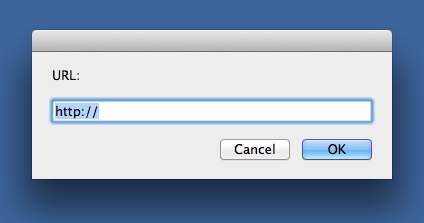
The script starts by asking for the link’s URL. I’ll usually paste this in or use one of my URL-gathering TextExpander snippets.
Lines 4-5 get the content of the front document and have nextreflink provide the next number for a reference link. We use the bbstdin trick of the previous section to make sure nextreflink’s input is in the format it needs.
Line 7 checks the length of the selection. If it’s zero, Lines 9-12 insert [][n], where n is the next reference link number, and set the cursor between the first two brackets. If there is selected text, Line 16 puts brackets around the text and adds the reference link afterward: [link text][n]. Line 17 then puts the cursor after the final bracket.
Lines 21-24 save the location of the cursor, move to the end of the document, insert the reference and URL, and return to the saved cursor location. Boom. Instant reference link, regardless of whether you start with a blinking cursor or a text selection.
I call the AppleScript “Reference link” and keep it in my BBEdit Scripts file. It’s keyboard shortcut is ⌃L.
Notes
- This system feels faster than my TextMate system, largely, I think, because it doesn’t scroll the window down and up as the parts are added to the document.
- I wish AppleScript would give me a wider text field in the dialog box so I could see more of the URL I’m inserting.
- There are some subtleties to the way BBEdit handles
selectionandinsertion pointin AppleScript. I’ll have to commit those subtleties to memory if I’m going to be an effective BBEdit scripter.