
Downcast All Played playlist
July 8th, 2012 at 9:43 pm by Dr. Drang
I like to delete podcast episodes from Downcast manually instead of setting up a rule for when to delete them. I do this because I often listen to podcasts late at night and fall asleep while they’re playing. I don’t want Downcast to delete an episode that it thinks I’ve listened to just because it played it all the way through.
Deleting several episodes from different podcasts takes a lot of tapping and swiping, though:
- Tap on a podcast from the podcast list to show the episode list.
- Swipe on an episode to bring up the Delete button.
- Tap the Delete button.
- Tap to go back to the podcast list.
- Repeat.
To make this process go faster, I made an All Played playlist, defined like this:
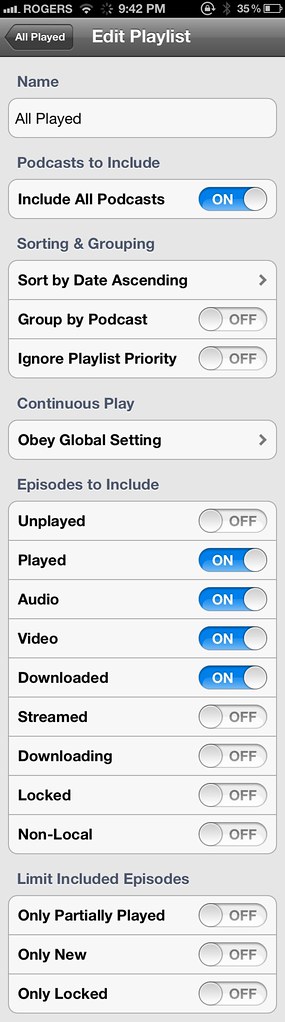
This puts all the played episodes in one list, where I can quickly delete the ones I’ve actually listened to without climbing up and down the podcast list.


July 8th, 2012 at 10:30 pm
Great tip, thanks. One question-what is your screenshot trick? Is this multiple images stitched together, or are you using some screenshot voodoo I’m unfamiliar with?
July 8th, 2012 at 10:36 pm
Did you take that screenshot exactly at 9:42 AM intentionally? :-)
July 8th, 2012 at 10:50 pm
I mean, 9:42 PM. (Sorry for increasing the entropy in your blog.)
July 8th, 2012 at 11:22 pm
No voodoo, Dan, it’s three screenshots stitched together.
I don’t know the significance of 9:42, Jan, so it couldn’t have been deliberate.
July 8th, 2012 at 11:40 pm
Awesome tip. I’ve the exact same use-case as you, and was thinking about this just this morning. My first thought was that I’d like the “PLAYED OR EMPTY” list to sort by last played, but your solution is even better.
July 9th, 2012 at 8:28 am
I do something similar for a different reason. I subscribe to 50 podcasts. I download them so I do not incur any 3g charges for streaming. I keep track of how many hours I listen to so that I don’t take away from family time (long story but at one time I was listening to 70 podcasts). I have around 1GB of storage used by podcasts at any one time. While I do want to know if an episode played, I don’t want the disk space taken up. I clear my played list every Monday for the next week. I have requested a feature to the downcast developer (Seth - the amazing) that would could “auto” delete the played episode by “convert to stream”. This would keep it in my “played playlist” but free up the diskspace. In your case, if you fell asleep you could just play it as a stream or “convert to download” then listen.
July 9th, 2012 at 12:34 pm
I tend to use a sleep timer if I listen to podcasts in bed. Go to the Clock app on iPhone, then Timer, and change the alarm sound from the default “Marimba” to the last option, which is to stop playback. Besides not having to set deletion to manual mode, this method also has the advantage that I’m not leaving my phone squaking all night.
July 9th, 2012 at 8:10 pm
Sorry for not explaining myself properly, doctor. The significance is that, in almost every official iPhone ad, the time is always set to 9:42 (AM). This is a plausible explanation for that. Since you didn’t know about it, that was an interesting coincidence. :-)
July 9th, 2012 at 8:59 pm
Carl, I used the Clock app as a sleep timer when I listened through the Apple Music player. Downcast has a timer built in, so I try to use that. Often I fall asleep before I remember to set the timer.